One server for your
whole fiber network.
DTVSOL Super Router is the subscriber gateway, the OLT manager and the screen of your support room — in one program, on your own server. Your billing talks to one API; your team watches one page.
Install guide →See it working →
Or call us:Call us — enable JavaScript to see the number, or use the contact form.
- TR-069: all automatic
Your billing creates the service; the router registers the ONU, gives it its address and speed, and sets its Wi-Fi over TR-069 — nobody touches it. - DTVSOL Super Keeper
Who held which address and port — and, where the law asks, every connection: answered in a second, proven untouched, on your own server. - Monitor and alarms
Every ONT’s light and state, watched every minute; the 24/7 wall for your support. - DTVSOL Super TV
Our professional IPTV, unicast: every viewer their own stream, straight to the OLT on its own VLAN — the TV traffic never loads the router. One team, one support.
No middleman between your billing and your OLT.
The Super Router drives your OLTs itself — over SNMP, with the OLT’s command line as the backup. You need no separate OLT manager, no cloud OLT service charged per ONU, no scripts and no extra server: one system from the billing to the fiber.
The ONT, set up by the router
Registering a new ONT, its service on the right VLAN, its speed, a suspension, a reboot — the router does it on the OLT the moment your billing asks.
The OLT, watched by the router
Optical levels, ONTs offline, PON ports and boards are read every few minutes, graphed and alarmed — in the same monitor as the rest of your network.
One record per subscriber
Subscriber, address, plan, VLAN and ONT live in one place. Nothing to keep in step between programs, nothing to type twice.
No fees for a middleman
No monthly bill per ONU for an OLT manager, no extra server to keep alive: the OLT control is part of the router you already pay for.
Enter the client. Plug in the ONU. Done.
A small operator needs only a spreadsheet for the payments and one technician for the fiber — the Super Router does the rest. No billing system to buy, no network administrator, no OLT program.
The owner enters the client — once
Name, the ONU’s serial number and the plan. Pick a plan, or just type the speed and the plan is created for you.
The technician plugs in the ONU
At the customer’s home: fiber and power. Nothing else — no laptop, nothing to type.
The router does the rest
It finds the ONU, sets it up on the OLT — VLAN, speed, fixed address — and sends its Wi-Fi settings by TR-069. The client turns green in the monitor.
An ONU that does not take TR-069 — or you do not use it? The router prints a settings card for the technician: connection, VLAN, PPPoE login, Wi-Fi — to photograph or share.
Or call us:Call us — enable JavaScript to see the number, or use the contact form.
A suspended client sees your page, not a dead line.
No more calls asking why the internet is down: the subscriber already sees why — and how to pay.
Built to be the best router a fiber operator can own.
The times here were measured on our lab network, with a real OLT and real subscribers. The 100,000 is not among them: the Super Router is designed for up to 100,000 subscribers per server — an estimate; we size the server with you.
to load 15,000 subscribers
The accounting, anti-spoofing and CGNAT sets of 15,000 subscribers loaded in about half a second, measured on our lab.
to leave a dead upstream
BFD sees a failed link or upstream in under a second and BGP moves the traffic to the other one. Without BFD, BGP needs 1.5 to 4 minutes.
to read every ONT’s light
The fibre levels of all the ONTs on an OLT are read over SNMP in about a minute per round, paced to spare the OLT. The CLI stays as the backup.
to undo any mistake
Network and routing changes are undone by themselves unless you confirm them. A typo never takes your network down.
false route origins dropped
Switch on origin validation and routes with a false origin are dropped from the full table, checked against the regional registries’ trust anchors.
command finds the problems
dtvsol doctor checks the whole router — QinQ MTU, CGNAT port blocks and rules, duplicate addresses, what survives a reboot, the OLT against the router — and says what to type to fix each one.
Your MikroTik routers, your BNG and your OLT manager: one server.
Replace all your MikroTik routers, or any other BNG, with one server.
One place for everything
Every PON VLAN, one CGNAT, one set of rules, one database — no subscribers split across boxes, no configurations to keep in step.
Easy to repair
Standard server parts from any supplier, swapped in minutes; with two power supplies and two mirrored disks (chosen at install) it keeps running meanwhile. A spare comes back from the backup.
Your billing keeps working
A MikroTik-compatible API beside the REST API, and we help you move the subscribers over.
Upstream drivers, fixed for you
Ubuntu 24.04’s Linux kernel: the largest driver community in the world, kept current by Ubuntu’s kernel updates. No forked kernel. If a driver bug hits your router, we build the fix, deliver it signed and send it upstream.
Already run a software BNG? The Super Router is a BNG too (PPPoE, IPoE, CGNAT, BGP) — and it also drives your OLTs, registers ONTs on the OLT and feeds your billing through one API.
* Designed for up to 100,000 subscribers per server — an estimate, not a measurement; we size the server with you. A mid-range server: one 32–64-core CPU, 128 GB of memory, two dual-port 100G cards. The OLT enforces the speed plans; the router routes and does the NAT and CGNAT. The real limit is your network’s traffic at the busy hour — we size the server with you.
Pay for a router, not for a team of administrators.
The Super Router does the work that usually needs network administrators on salary: it configures, checks and repairs itself, and your billing drives it.
No manual configuration
A new client, a plan change, a suspension: your billing makes one API call and the router sets up the VLAN, the address, the speed and the OLT.
No night shifts
The router checks itself, the network and every ONT every minute; the 24/7 wall shows your support team what is wrong, in plain words.
No expensive mistakes
Changes are checked before they run and undone by themselves if they would cut the network.
Updates and support
Updates and support by email or chat: included for the first 12 months, then with the monthly plan.
The technician connects the ONU. That is all.
No laptop at the customer’s door and nothing configured by hand. The technician plugs in the fiber and the power; the Super Router and your billing do everything else — and with every update the router does more.
Plug in, and leave
The technician connects the fiber and the power. Nothing to type, nothing to set up.
One click in your billing
The service is created: the router finds the new ONU on the OLT, registers it and gives it its VLAN, its fixed address and its speed — in seconds.
Set up over TR-069
The ONU calls the router: its Wi-Fi name and password come from your billing, and support changes or reboots it from the office. Any TR-069-capable model: learned once, on a learn bench, and shared with every Super Router through the model library.
Watched from the first minute
Its light levels, its state and its alarms are on the monitor and the 24/7 wall before the technician has left the street.
Next: firmware upgrades per model, in waves, and a speed test run from the ONU itself. TR-069 →
The police ask. You answer in one second.
“Who used public IP X, port Y, on 14 March at 21:05?” With CGNAT, operators usually keep billions of connection lines and search them by hand for days. The Super Router gives each subscriber a fixed public address and port block, so it only records who held which block, and when — and answers at once, with the name, the contract, the MAC and the ONT serial.
$ dtvsol lawful lookup XXX.XXX.XXX.10 40123 "2026-03-14 21:05:33" --case F-118

  found: 1
  Ana García  (svc_demo0042)
    from 2026-02-02 10:14:07 +00:00  until now
    public XXX.XXX.XXX.10 ports 39936-40959   private 100.80.12.37
    MAC 00:11:22:33:44:55   ONT HWTC00000001   contract CONTR-01842

$ dtvsol lawful verify
  verified: no record changed or missing (1523 records)
One command, one answer
An address, a port and a time — the subscriber who held them, even months later. By API, CLI or the monitor, with a CSV to attach.
Proof it was not changed
Every record and every search is sealed: a row changed by hand, even directly in the database, is detected.
Kept, then deleted
Kept 12 months (6 to 120), then deleted by itself, as privacy laws require. Every search is logged with its case number.
Stays with you
On your router, never in a backup that leaves your premises. Off until you switch it on.
How the lawful log works →Every connection: DTVSOL Super Keeper →
See the network the way your support team needs it.
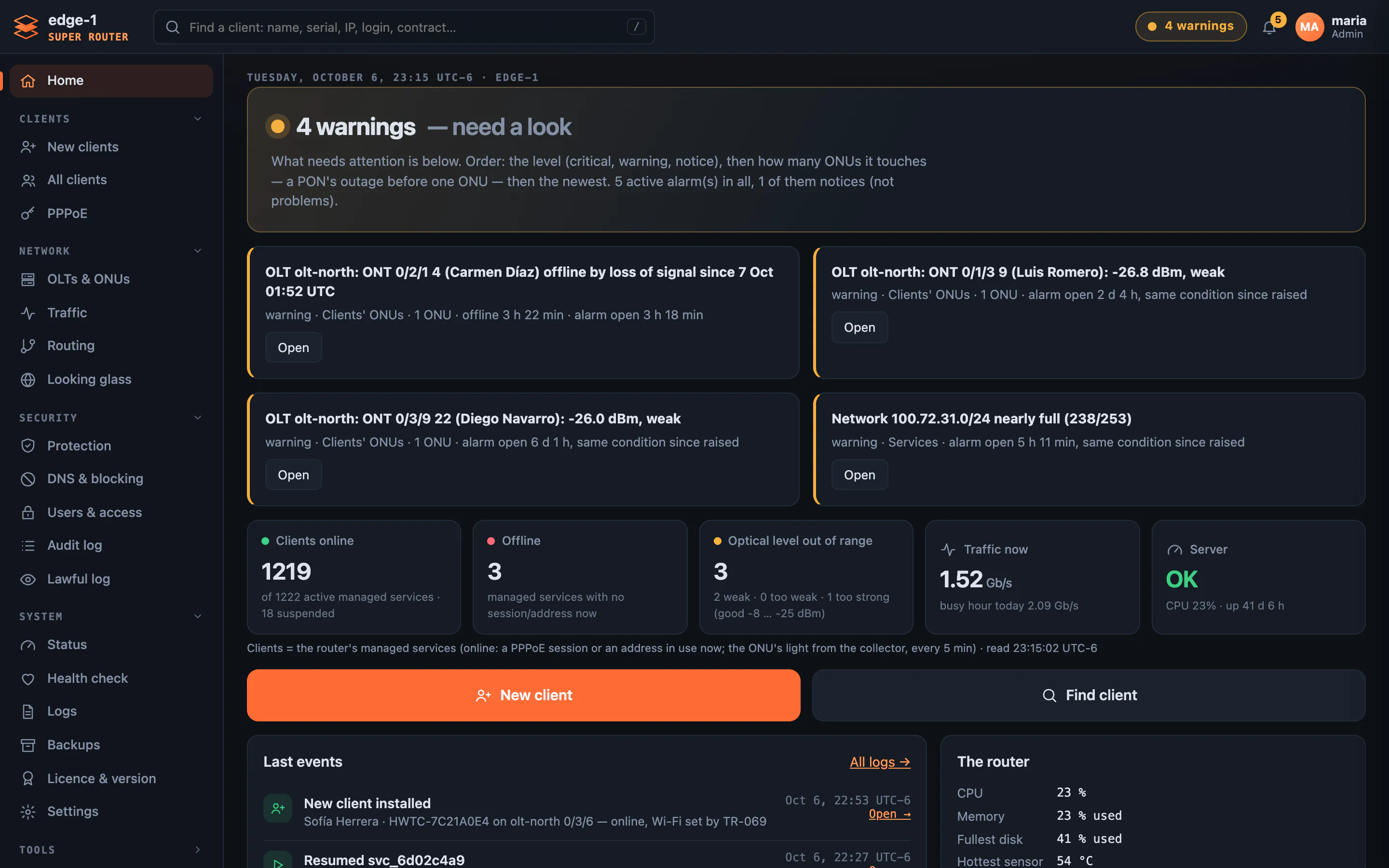
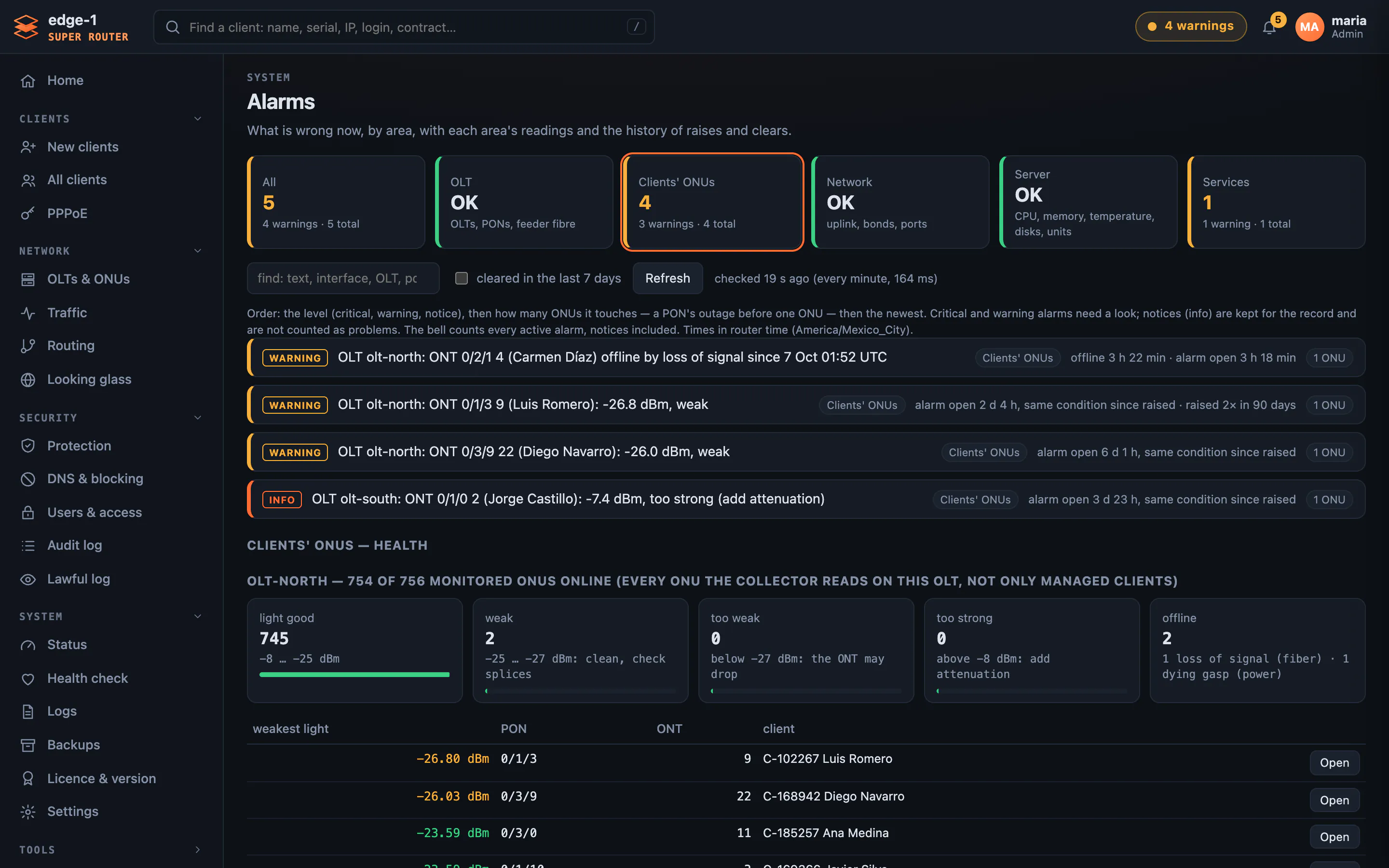
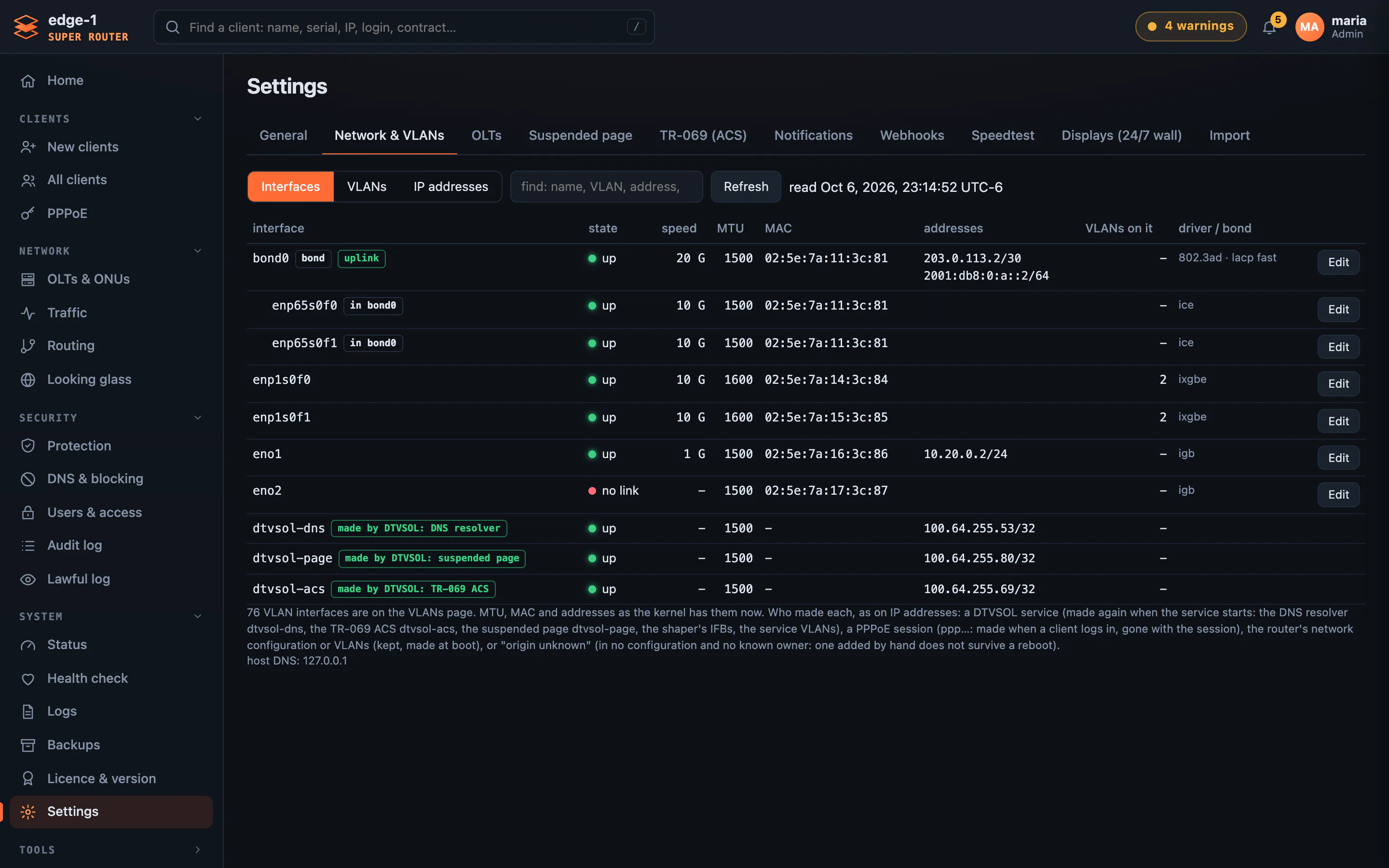
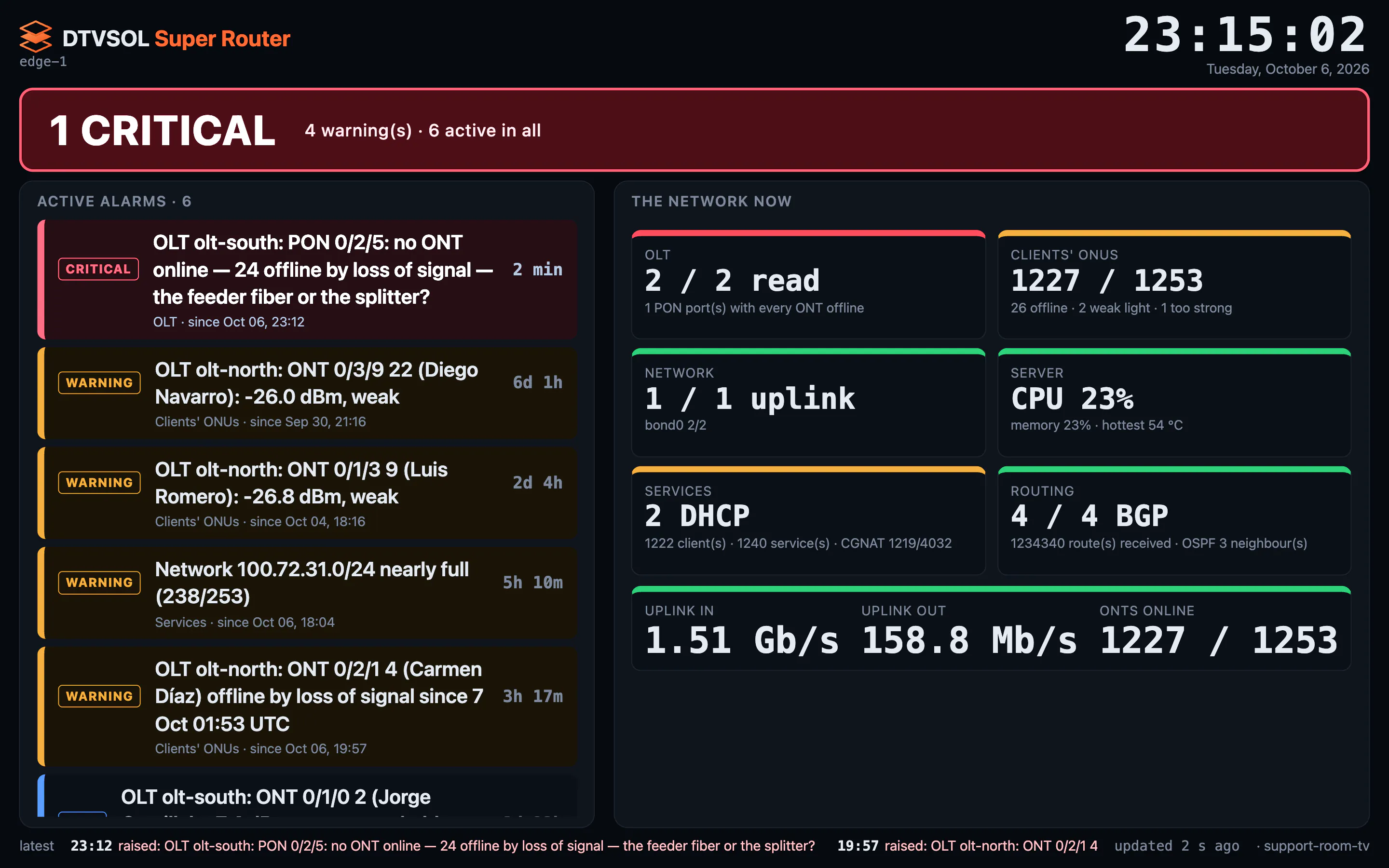
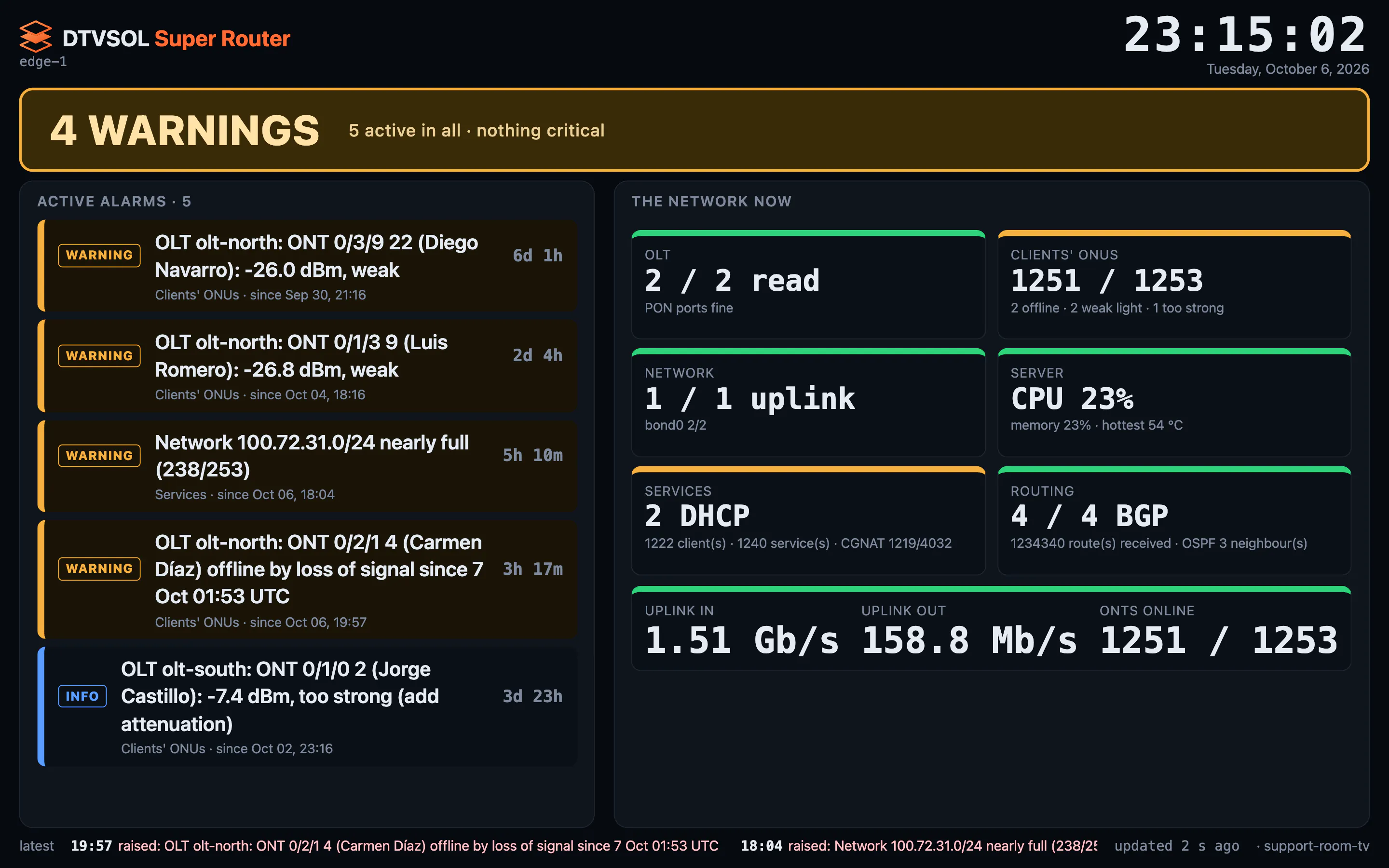
The page the monitor opens on: all OK, or what needs a look, the worst first — with the clients online, the light, the traffic and the server in one row.
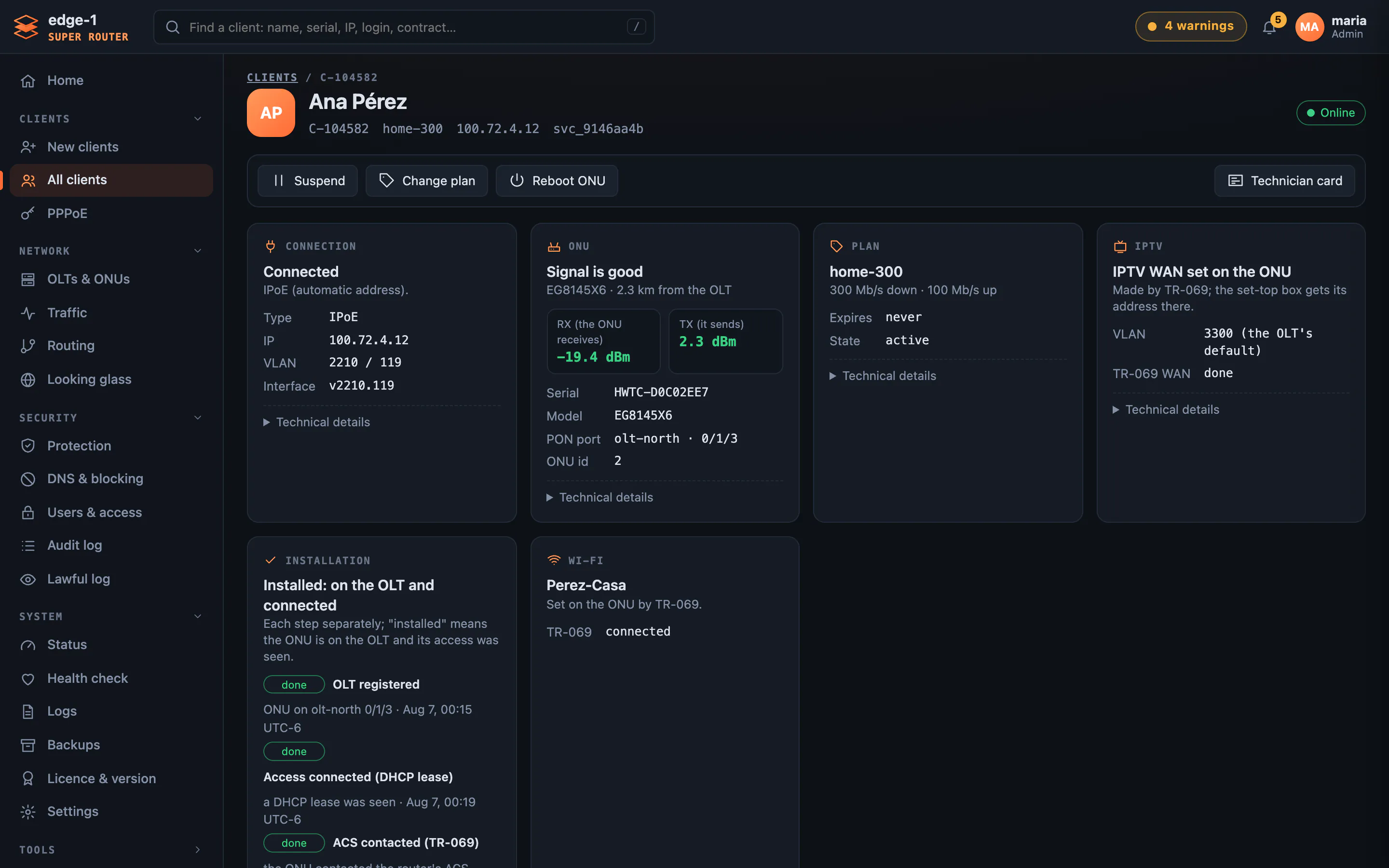
One client on one page: connection, ONU signal, plan, IPTV, Wi-Fi and history — suspend, change the plan or reboot the ONU from there.
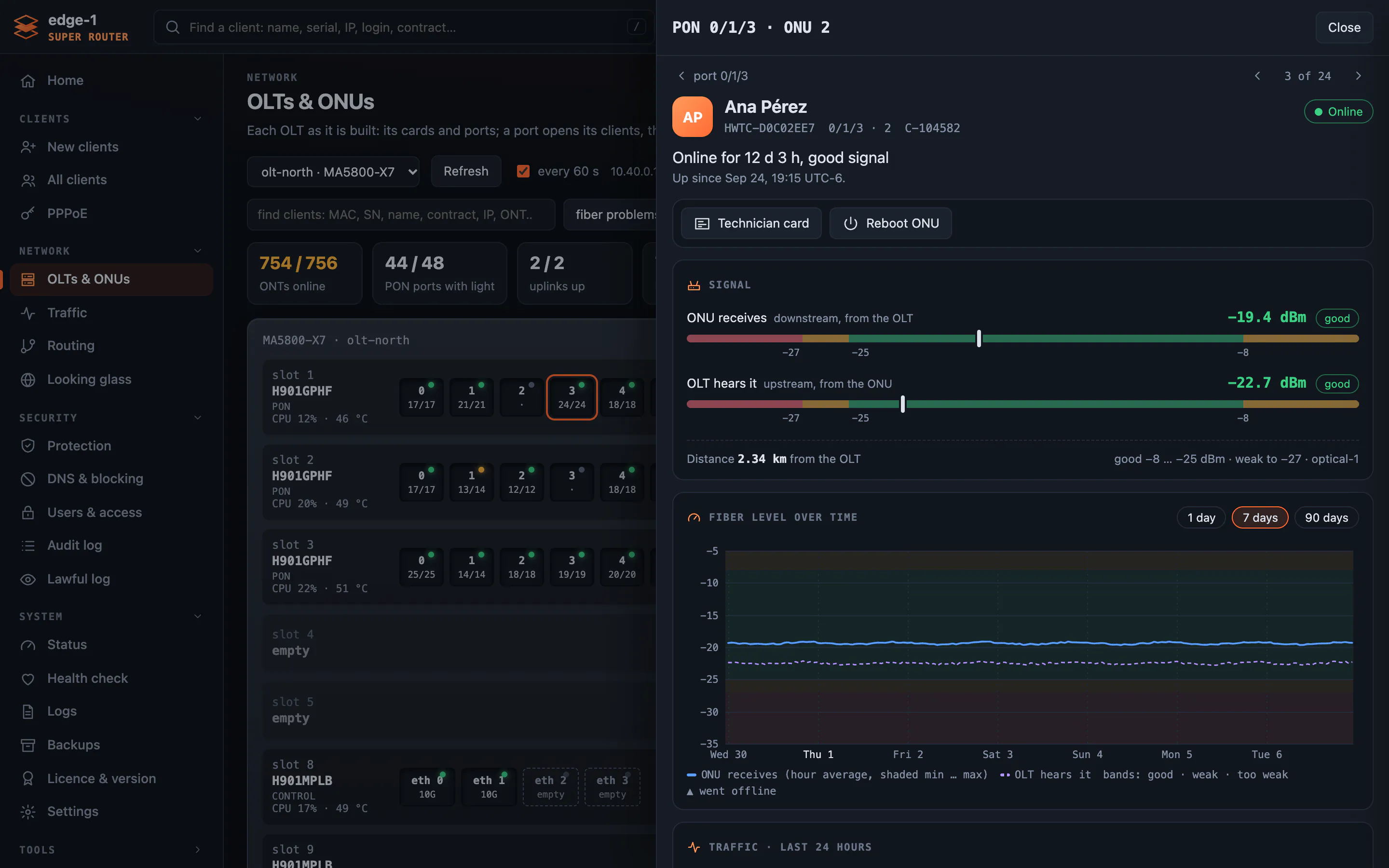
Boards and PON ports as the OLT has them; a port opens its clients, and a client its ONU card — signal, fiber history, traffic and events.
Alarms by area — OLT, clients’ ONUs, network, server, services — each with its own readings: here, every ONT’s light, the weakest first.
Interfaces, VLANs, addresses and protection, changed from the browser with a 120-second safety net and roles for admins, viewers and the office.
A TV in the support room: all OK in green, or what is wrong in red — critical alarms pulse, the oldest first.
The whole tour →Everything an operator needs
All features →Subscribers and DHCP
DHCPv4 and v6, Option 82, one VLAN per PON port
OLT control
Huawei over SNMP, and a live console of every command
Plans and speeds
Pushed to the OLT; suspend, resume and end dates
CGNAT and NAT
Fixed port blocks per client, logged for the authorities
Protection and blocking
Anti-spoofing, login protection, the authorities’ blocked domains and IPs
Alarms and the wall
Checked every minute, by area, with a history
Safe changes
Undone after 120 seconds unless you confirm
Billing API
REST, and MikroTik-compatible
BGP and OSPF
Your blocks to your upstreams, failover, DDoS blackhole
Speedtest server
Ookla built in: your clients test the speed to you
Promotions
Saturday 2×, every night 3× — on the router, or on a Huawei OLT
Notifications
Email, WhatsApp, Telegram and SMS, when something breaks
Moving from your MikroTiks, in four steps
Size the server
You send us your numbers — subscribers, OLTs, uplinks, traffic — and we choose the parts with you.
Install it yourself in an hour with the guide, or we install it with you — free.
Next to your current routers; nothing is switched yet.
Move PON by PON
A few PON ports at a time, each one checked on the monitor before the next.
Switch off the old BRAS
When the last port has moved. Keep one as a spare, or sell them.
Pay once for the router. Never per subscriber.
One licence per router, paid once, yours for good. DTVSOL Super TV servers have a monthly plan.
Super Router licence
per router, paid onceBuy it once, use it forever. No limit on subscribers, no limit on traffic, no time limit. 12 months of software updates included; after that the router keeps running exactly as it is.
DTVSOL One is the door: you create your company there (free), buy the licence and join the router once. After that you can run the router with your own billing: Splynx and MikroWisp (tested end to end), any RADIUS billing, and billings that drive a MikroTik over its API (queues, address lists, PPP accounts) — UISP included — since the router answers on the MikroTik API port as a MikroTik. Plus the CLI and API. You never need to open DTVSOL One again. Your router stays yours either way.
DTVSOL Super TV servers
per server- A monthly plan for each TV server — ask us for the price
Payment by card (Stripe)No per-subscriber fee, everInstall it yourself in an hour with the guide, or we install it with you — free.
Install guide →See the prices →Read the documentation →
Or call us:Call us — enable JavaScript to see the number, or use the contact form.
How to get it
Register in DTVSOL One
Our cloud platform — free, two minutes.
Add your licences
As many perpetual licences as you need, one per router — pay by card, 250 USD each, once.
Download and install
The router, with the guide in DTVSOL One — or we install it with you, free.